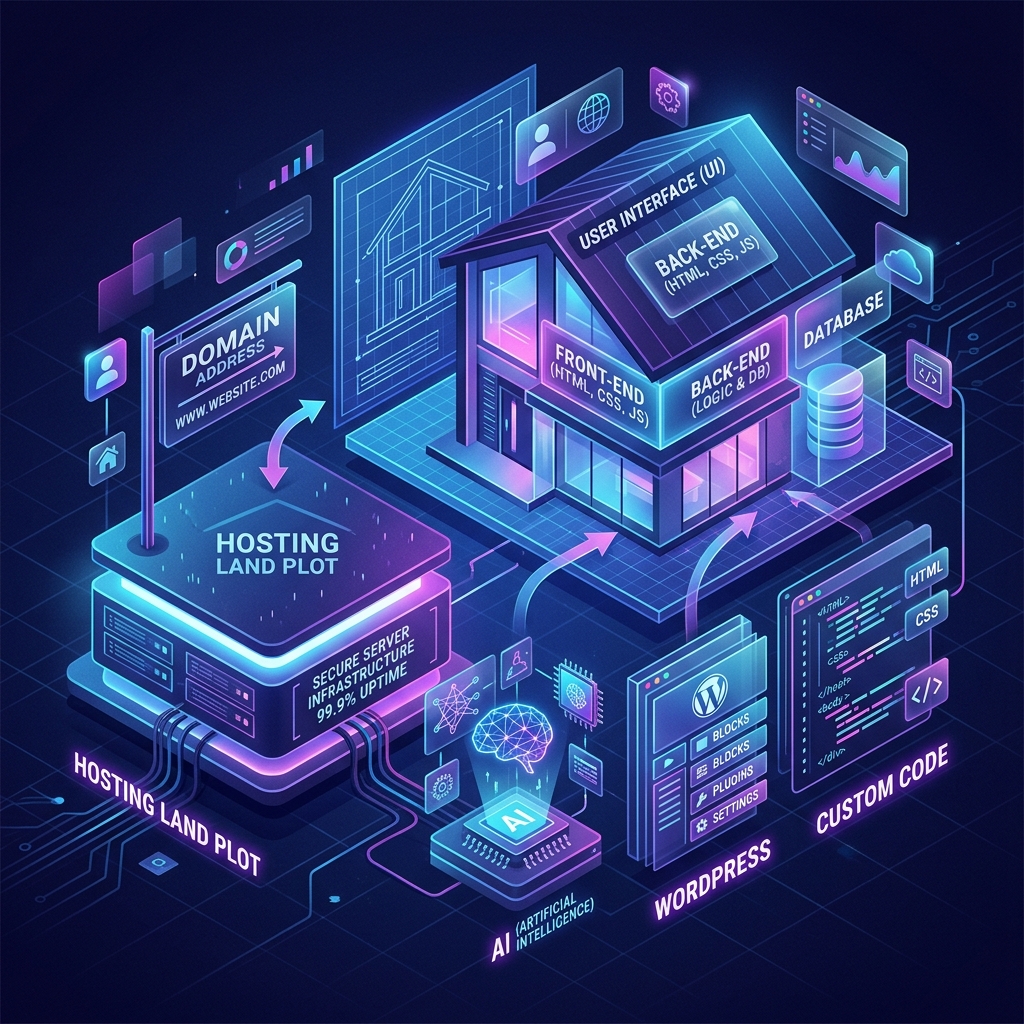
- 👉 Part 1: How Websites Are Built: Hosting, Domains & Tech Options
- Part 2: 2026 Realistic Cost Breakdown & Budget Guide →
- Part 3: Funnels, Social Media & Strategy →
If you are a business owner trying to establish or upgrade your online presence, web development jargon can make the process sound far more complicated than it actually is.
Terms such as hosting, domain, WordPress, HTML, CSS, JavaScript, AI website builders, and plugins often create confusion.
Understanding websites becomes straightforward once you use the right mental model:
Think of building a website like building a physical house.
Once you understand what goes into constructing a physical property, every single component of a website starts making perfect sense. In this first part of our 3-part guide, we will break down the essential building blocks of every website.
1. Hosting Is Your Land
Before laying a single block for a house, you need land. It doesn't matter how beautiful your architectural plan is—without a plot of earth to sit on, the house cannot exist.
In the digital world, hosting is your land.
A website is essentially a collection of digital files (text, images, graphics, and code). Hosting provides the server infrastructure connected to the internet 24/7 where those files are stored and served to visitors whenever they open a web browser.
- Shared Hosting: Like renting a small room in a shared apartment building. It is affordable, but if your neighbor gets a sudden spike in traffic, your site speed may feel the impact.
- Managed Premium Hosting: Like owning a secure, gated plot with dedicated power and security. It costs more per year, but your website runs faster, stays safe, and handles high traffic seamlessly.
2. Your Domain Is Your Address
Now that you have land, how do customers visit your house? They need your physical street address.
Your domain name is your digital address (for example, yourbusiness.com).
The distinction between hosting and domain is simple:
- Hosting is where the website lives.
- Domain is how people find it.
When someone types your domain into their browser, the internet points them directly to the server land where your website files sit. Owning your own .com or .ng address establishes immediate authority, ownership, and client trust.
3. What Are You Actually Trying to Build?
Before picking a technology tool, you must ask: What does your business actually need this website to do?
Different business requirements demand different technical builds:
- Display Information: Present your company profile, working hours, and services clearly.
- Generate Leads: Capture visitor contact details through strategic inquiry forms.
- Sell Products: List items, manage shopping carts, process online payments, and issue receipts.
- Publish Articles: Post regular resources and content to rank on search engines.
- Collect Bookings: Allow clients to schedule appointments directly into your calendar.
- Automate Workflows: Connect web forms directly to your CRM, WhatsApp alerts, or email sequences.
4. Choosing How to Build Your Website
Just as you can build a house using prefabricated container frames, standard brick-and-mortar construction, or custom architectural design, you have three primary paths for building a website today:
A. DIY / AI Website Builders (Wix, Squarespace, Framer)
Visual builders and AI tools allow non-developers to create web pages quickly using templates or prompt assistants.
- Pros: Low barrier to entry, fast setup, and low initial monetary cost.
- Limitations: Designs can feel generic. Advanced customization is restricted, platform subscription fees continue indefinitely, and migrating your site off their platform later can be difficult.
B. Content Management Systems (WordPress / CMS)
WordPress powers over 40% of the web. It functions like modular house construction: you start with a strong foundational frame and attach specialized rooms (themes) and utilities (plugins) as your business grows.
- Pros: Unmatched flexibility and ownership. You can start with a simple business site and expand into an ecommerce shop, blog, or portal over time.
- Limitations: Requires ongoing software updates, security monitoring, and performance optimization.
C. Custom-Coded Websites (HTML, CSS, JavaScript)
Custom coding is like hiring an architect and contractor to construct a house specifically tailored to your exact blueprints.
- Pros: Tailored user experience, lighting-fast performance, high security, and complete freedom to build proprietary business tools.
- Limitations: Higher upfront financial investment. Updating complex features requires developer support unless paired with a headless CMS.
Now that you understand the building blocks, let's explore actual 2026 pricing for each approach.
Read Part 2: 2026 Cost Breakdown & Budget Guide →